Why Modern Website Design Matters More Than Ever
Web Design Trends in 2026 are changing the way businesses attract visitors, communicate their value and turn website traffic into real enquiries and customers. A modern website is no longer simply an online brochure. Instead, it has become a digital salesperson, customer-service channel, credibility builder and important part of a company’s marketing strategy.
Today, visitors expect websites to load quickly, work perfectly on smartphones, provide clear information and make it easy to take action. At the same time, businesses want their websites to support SEO, generate leads, strengthen branding and deliver measurable results.
Therefore, simply following attractive visual trends is not enough. The best approach is to combine creative web design with usability, accessibility, performance, SEO and conversion strategy.
Google recommends paying attention to overall page experience, including mobile usability, secure delivery and Core Web Vitals. Core Web Vitals measure loading performance, responsiveness and visual stability, with Google’s current guidance targeting LCP within 2.5 seconds, INP below 200 milliseconds and good CLS performance.
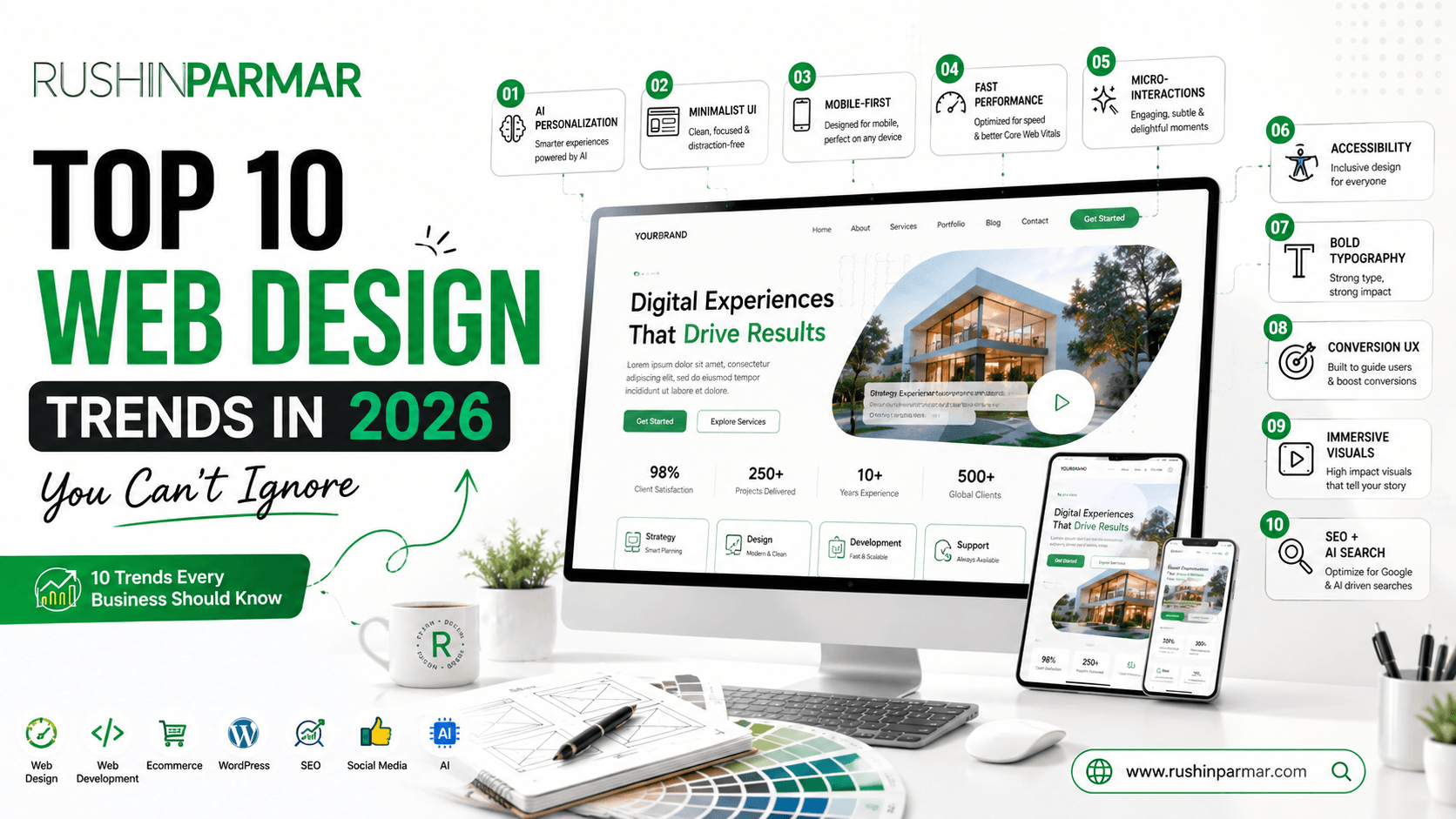
In this Top 10 Web Design Trends in 2026 guide, we will explore ten important Top 10 Web Design Trends in 2026 that businesses, marketers and website owners should understand before planning a new website or redesigning an existing one.
1. AI-Powered Personalization Is Becoming More Practical
Smarter Websites That Adapt to Visitors
One of the biggest changes in modern websites is the increasing use of artificial intelligence to create more relevant digital experiences.
Traditional websites generally show the same content to every visitor. However, AI-powered experiences can potentially use visitor behaviour, preferences, location, previous interactions and other signals to make content more relevant.
For example, an e-commerce website could recommend products based on browsing behaviour. A service business could highlight different solutions based on the visitor’s interests. A website chatbot could answer common questions and guide visitors toward the right service.
AI can also help website owners analyse user behaviour and identify areas where visitors leave the website.
However, personalization should be useful rather than intrusive. Businesses should avoid overwhelming visitors with unnecessary pop-ups, excessive tracking or complicated interfaces.
How Businesses Can Use It
You can introduce AI gradually through:
- AI-powered chat assistants
- Product recommendations
- Personalized content suggestions
- Smart search
- Automated FAQs
- Lead qualification
- Behaviour analysis
- Content recommendations
The goal is simple: show visitors the information they need at the right moment.
2. Minimalist Design With Strong Visual Hierarchy
Less Clutter, More Clarity
Minimalism continues to influence modern website design because users want to understand a website quickly.
A minimalist website does not mean an empty website. Instead, it means removing unnecessary elements and giving important content enough space to stand out.
Modern minimalist websites commonly use:
- Generous white space
- Clear typography
- Limited colour palettes
- Simple navigation
- Strong headings
- High-quality imagery
- Short content sections
- Clear CTA buttons
For example, instead of placing ten different messages inside a homepage hero section, a business can communicate one strong value proposition followed by a supporting sentence and a clear CTA.
This makes the visitor’s next step obvious.
Why It Works
When users can quickly understand:
What you offer → Who you help → Why you’re different → What they should do next
the website becomes easier to navigate and more conversion-friendly.
For businesses, this approach is particularly useful because it can make a website look more professional without relying on excessive visual effects.
3. Mobile-First and Responsive Experiences
Design for the Smallest Screen First
Mobile browsing continues to influence how websites should be planned.
Instead of designing a desktop website and simply shrinking it for mobile, modern designers increasingly think about the mobile experience from the beginning.
A mobile-first approach considers:
- Thumb-friendly navigation
- Readable typography
- Fast loading
- Touch-friendly buttons
- Shorter content blocks
- Optimized images
- Simple forms
- Mobile-friendly menus
Google’s page-experience guidance specifically encourages websites to display well on mobile devices and provide a good overall user experience.
Think Beyond “Responsive”
Responsive design should not simply mean that everything fits on a smaller screen.
A good mobile experience should also answer:
Can the visitor understand the page quickly?
Can they find the menu easily?
Can they contact the business without zooming?
Can they complete the desired action with minimal effort?
This is particularly important for local businesses because many potential customers discover businesses while using smartphones.
4. Faster Websites and Performance-First Design
Speed Is Part of the User Experience
Beautiful design cannot compensate for a website that takes too long to load.
Visitors can leave when pages feel slow, buttons respond poorly or content shifts unexpectedly.
That is why performance should be considered during design and development rather than treated as a final technical task.
Google’s Core Web Vitals focus on three important areas: loading performance through LCP, responsiveness through INP, and visual stability through CLS. Google recommends good Core Web Vitals for both user experience and search success, while also noting that good scores alone do not guarantee top rankings.
Practical Performance Improvements
Businesses can improve website performance by:
- Compressing images
- Using modern image formats
- Reducing unnecessary scripts
- Optimizing fonts
- Using caching
- Reducing excessive animations
- Choosing suitable hosting
- Removing unnecessary plugins
- Optimizing CSS and JavaScript
- Monitoring Core Web Vitals
Performance is therefore not simply a developer concern.
It is a business concern.
A faster website creates a smoother experience and gives visitors fewer reasons to leave.
5. Interactive Storytelling and Micro-Interactions
Make the Website Feel Alive
Static websites can communicate information, but carefully planned interactions can make the experience more engaging.
Micro-interactions are small visual responses that occur when users interact with a website.
Examples include:
- Button hover effects
- Animated icons
- Scroll-based transitions
- Progress indicators
- Image reveals
- Interactive cards
- Animated statistics
- Navigation transitions
- Form feedback
These effects can help communicate relationships between different elements.
However, there is an important distinction between useful interaction and visual distraction.
Too many animations can make a website feel slow or confusing.
The Better Approach
Use animation to:
Guide → Explain → Confirm → Delight
For example, when a visitor clicks “Get a Quote,” a subtle interaction can confirm that the form has been successfully submitted.
That small detail creates confidence.
6. Accessibility Is Becoming a Core Design Requirement
Design for More People
Accessibility should not be treated as an optional feature added at the end of development.
A professional website should be usable by as many people as reasonably possible, including visitors who use assistive technologies or have visual, auditory, physical or cognitive disabilities.
W3C’s WCAG 2.2 provides internationally recognized guidance for making web content more accessible. It includes areas such as keyboard accessibility, focus visibility, target sizes, understandable content and accessible authentication.
Important Accessibility Practices
Designers should consider:
- Adequate colour contrast
- Readable typography
- Alternative text for meaningful images
- Keyboard navigation
- Visible focus states
- Descriptive links
- Accessible forms
- Clear error messages
- Logical heading structure
- Touch-friendly controls
Accessibility can also improve usability for people who do not consider themselves disabled.
For example, clear text, logical navigation and readable buttons benefit almost everyone.
Therefore, accessibility and good UX often support each other.
7. Bold Typography Becomes a Major Branding Tool
Let Typography Communicate Personality
Typography is no longer simply about selecting a font that looks attractive.
In modern website design, typography can become one of the strongest elements of brand identity.
A strong typography system may use:
Large headline → Supporting statement → Body copy → CTA
This creates visual hierarchy and makes content easier to scan.
Businesses can use typography to communicate different personalities:
- Professional
- Premium
- Friendly
- Innovative
- Traditional
- Creative
- Technical
Better Typography Strategy
A website should normally establish a consistent system for:
- Heading sizes
- Paragraph sizes
- Line spacing
- Font weights
- Button text
- Navigation
- Captions
- Mobile typography
The goal is not to use as many fonts as possible.
Instead, choose a small, consistent type system that strengthens the brand.
Good typography makes information easier to understand before visitors consciously realize why.
8. Conversion-Focused Hero Sections and Clear CTAs
Your First Screen Has a Big Job
When someone lands on a website, the first section needs to communicate the business quickly.
A strong hero section usually answers three questions:
What do you offer?
Who is it for?
What should I do next?
For example:
Professional Web Design for Growing Businesses
Build a fast, modern and SEO-friendly website designed to turn visitors into customers.
Then the CTA could be:
Get Your Website Quote
or
Book a Free Consultation
Build a Clear Conversion Journey
The CTA should not appear randomly throughout the website.
Instead, create a natural journey:
Attention → Interest → Trust → Value → Action
Trust signals can include:
- Client testimonials
- Case studies
- Reviews
- Certifications
- Portfolio
- Business information
- Guarantees where genuinely applicable
- Clear contact information
This approach turns the website from a simple information source into a structured conversion experience.
9. Authentic Visuals, Video and Immersive Content
Show Instead of Just Tell
Stock photography can sometimes make a website feel generic.
In contrast, authentic photographs, original graphics, product images, videos and project visuals can help visitors understand what a business actually does.
For example, a manufacturing company could showcase:
- Factory photographs
- Machinery
- Products
- Production processes
- Completed projects
- Team activities
A service business could showcase:
- Portfolio projects
- Before-and-after examples
- Client results
- Behind-the-scenes work
- Short educational videos
Use Visual Content Strategically
However, more images do not automatically create a better website.
Every visual should have a purpose.
Ask:
Does this image explain something? Does it build trust? Does it demonstrate quality? Does it support the CTA?
If the answer is no, it may not need to be there.
Also remember that large videos and images can affect performance. Therefore, visual storytelling should always be balanced with speed and usability. Google’s Core Web Vitals guidance makes performance an important part of the overall user experience.
10. SEO, GEO and AI-Search-Friendly Website Structure
Build Websites for Humans and Modern Search
SEO is evolving beyond simply inserting keywords into website pages.
A modern website needs useful content, logical structure, strong internal linking, clear entities and helpful answers to real customer questions.
At the same time, businesses increasingly want their information to be discoverable across traditional search engines and AI-powered discovery experiences.
This means website content should clearly communicate:
- Who the business is
- What it offers
- Where it operates
- Who it serves
- What makes it different
- What products or services it provides
- How customers can contact it
For a local business, location relevance is particularly important.
For example, a web professional serving Ahmedabad could naturally build useful content around services, industries, locations, FAQs, case studies and customer problems rather than repeatedly forcing the same keyword onto every page.
Create Helpful Content Around Customer Questions
A strong website can include:
- Service pages
- Location pages
- FAQ sections
- Case studies
- Portfolio pages
- Comparison guides
- Educational blog posts
- Industry pages
- Process pages
- Testimonials
The objective is not to create content for search engines alone.
Instead:
Create genuinely useful information → organize it clearly → make it easy to discover → support it with strong technical foundations.
How to Combine These Trends Without Overdesigning Your Website
Following every trend at once is not necessarily a good strategy.
A website can become visually impressive but commercially ineffective if it contains excessive animations, complicated navigation, huge videos and unnecessary features.
Instead, select trends based on your business goals.
For a Local Service Business
Prioritize:
- Mobile-first design
- Local SEO
- Strong hero section
- Testimonials
- Clear CTA
- Fast performance
- FAQ content
- Contact/WhatsApp options
For an E-Commerce Business
Prioritize:
- Product discovery
- Smart search
- Product recommendations
- Fast checkout
- Mobile UX
- High-quality product visuals
- Trust signals
- Performance
For a Professional Service Company
Prioritize:
- Strong personal/company branding
- Portfolio
- Case studies
- Thought-leadership content
- Clear service pages
- Testimonials
- Lead-generation forms
- SEO content
For a Startup
Prioritize:
- Strong positioning
- Modern visual identity
- Simple navigation
- Product storytelling
- Interactive demonstrations
- Conversion-focused CTAs
- Scalability
What Should You Avoid in Modern Website Design?
Trends can be useful, but some design decisions can hurt usability.
Avoid:
- Excessive animations
- Autoplay videos with sound
- Tiny text
- Complicated navigation
- Too many pop-ups
- Huge unoptimized images
- Low-contrast text
- Generic stock photography everywhere
- Too many fonts
- Long forms with unnecessary fields
- Hidden contact information
- Slow third-party scripts
- Designing only for desktop
- Adding AI simply because it is fashionable
A professional website should never sacrifice usability just to look trendy.
How These Trends Affect SEO and User Experience
The relationship betweenWeb Design Trends in 2026 and SEO is becoming increasingly important.
A visually attractive website can still perform poorly if visitors cannot navigate it or if pages are slow.
Likewise, an SEO-friendly website can struggle if its design makes visitors uncomfortable or confused.
Google’s guidance emphasizes overall page experience rather than one isolated ranking factor. Good Core Web Vitals are recommended, but Google explicitly states that strong scores do not guarantee top search rankings.
Therefore, your strategy should combine:
SEO + UX + Performance + Accessibility + Content + Conversion
rather than treating these as separate activities.
Conclusion: Web Design Trends in 2026
Don’t Follow Trends—Use Them Strategically
The future of website design is not simply about making websites more beautiful.
It is about making websites more useful, accessible, faster, intelligent, memorable and conversion-focused.
The strongest Top 10 Web Design Trends in 2026 combine visual creativity with practical business objectives. AI can improve personalization, minimalist layouts can improve clarity, mobile-first design can improve usability, performance can reduce friction, accessibility can make websites more inclusive, and better content structures can support search visibility.
However, your website does not need every new feature of 10 Web Design Trends in 2026.
The right approach is to select the trends that support your audience, industry and business goals.
If your website can quickly communicate your value, build trust, answer questions, perform smoothly and make it easy for visitors to take action, you already have the foundation of a strong modern digital presence.
Let’s Build Your Digital Brand
Your Website Should Work as Hard as Your Business Does
Whether you need a new website, website redesign, WordPress website, E-Commerce website, SEO strategy or complete digital marketing solution, Rushin Parmar can help you create a stronger digital foundation.
Don’t just build a website. Build a digital experience designed for growth.
Start Your Website Project Today Contact Now!