Learn how professional Web Design helps businesses build trust, improve user experience, rank higher on Google, and convert website visitors into customers. in This Web Design Guide 2026 discover the complete anatomy of a high-converting website with expert tips from Rushin Parmar, Freelance Web Designer & Developer in Ahmedabad.
A Website Should Do More Than Look Beautiful. In today’s digital world, your website is often the first interaction potential customers have with your business. Within just a few seconds, visitors decide whether they trust your brand, want to explore further, or leave your website entirely. That is why Web Design is no longer just about attractive colors and layouts—it is about creating an experience that encourages visitors to become customers. In this artical we will discuss The Complete Web Design Guide to Building a High-Converting Website in 2026.
A professionally designed website combines visual appeal, functionality, speed, usability, and search engine optimization. Every section of the website should guide visitors toward taking meaningful actions such as requesting a quote, making a purchase, booking a consultation, or contacting your business.
Whether you are a startup, local business, manufacturer, retailer, healthcare provider, or service company, investing in professional Website Design can significantly improve your online credibility and business growth.
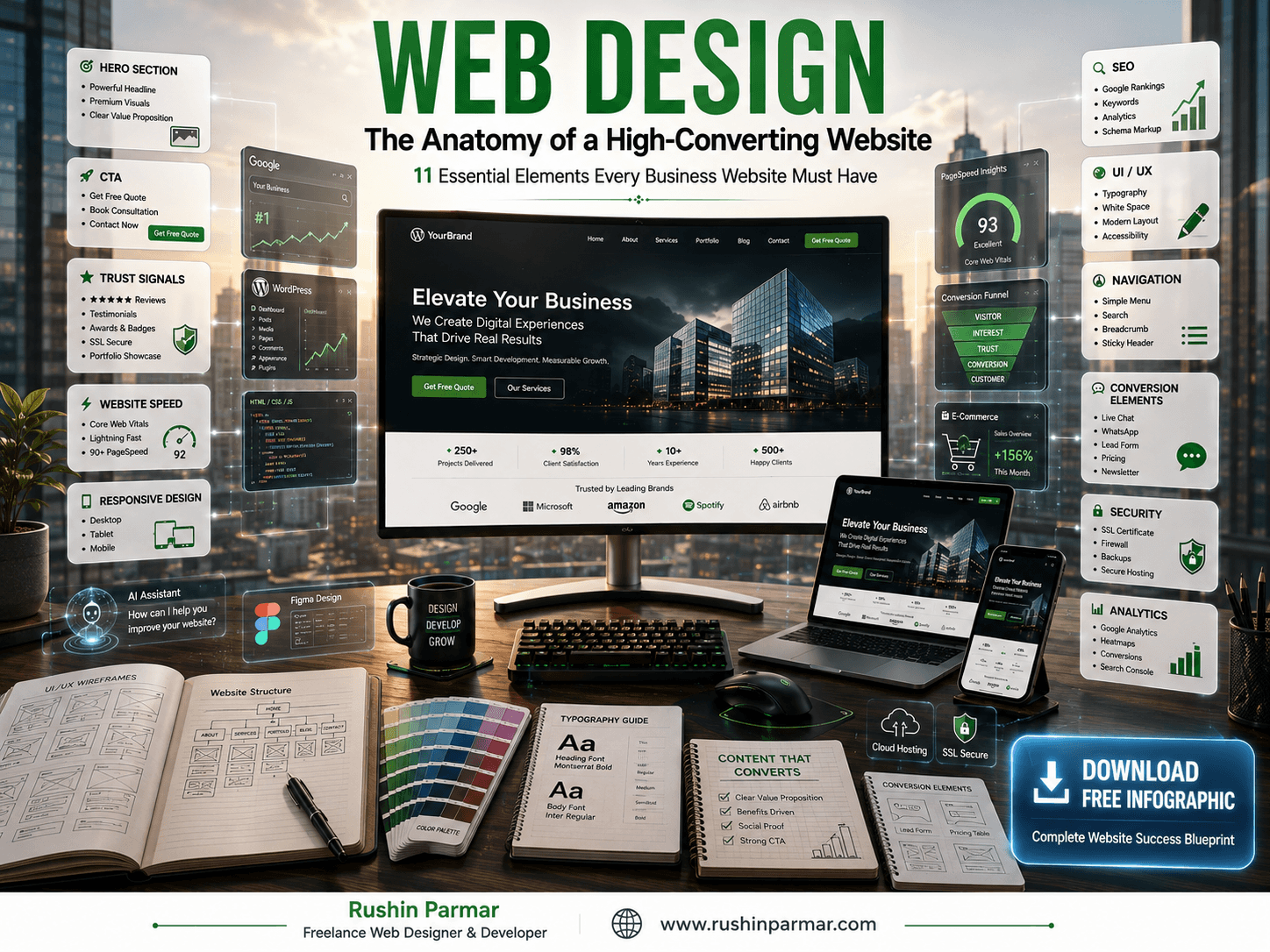
This comprehensive guide explains every important component that makes a website successful and highlights the essential elements behind a high-converting website.
What Is Web Design?
Creating Digital Experiences That Inspire Action
Web Design is the process of planning, designing, and organizing the visual appearance and user experience of a website. It combines creativity with strategy to ensure that every visitor enjoys an intuitive, engaging, and seamless browsing experience.
Modern web design involves much more than selecting colors or arranging images. It includes creating responsive layouts, defining typography, designing user-friendly navigation, optimizing page speed, structuring content, and ensuring compatibility across desktops, tablets, and smartphones.
A well-designed website should answer visitors’ questions quickly, communicate your brand clearly, and guide users toward your business goals through intuitive navigation and strong calls to action.
Professional web design also works closely with Web Development, ensuring that attractive designs are transformed into fast, secure, and fully functional websites.
Why Web Design Is Important
Your Website Is Your Most Valuable Digital Asset
A professionally designed website acts as your business’s digital headquarters. Unlike social media platforms, your website is fully owned and controlled by you, making it the most reliable place to showcase your products, services, expertise, and brand story.
Good web design offers several advantages:
- Builds trust and credibility.
- Creates a strong first impression.
- Improves customer experience.
- Increases conversions.
- Supports Search Engine Optimization (SEO).
- Enhances mobile usability.
- Strengthens brand identity.
- Generates qualified leads.
- Improves online visibility.
- Helps businesses grow consistently.
Your website should not simply exist—it should actively contribute to your marketing and sales efforts every day.
Web Design Guide 2026
1. Hero Section
Capture Attention Within the First Five Seconds
The Hero Section is the most important area of any website because it is the first thing visitors see. It sets the tone for the entire browsing experience and determines whether users continue exploring your website or leave.
A high-converting hero section should immediately communicate what your business does, who you help, and why visitors should choose you over competitors. It combines compelling headlines, supporting text, professional visuals, and a clear call-to-action to create an impactful first impression.
Essential Elements of a Great Hero Section
✔ Powerful headline
✔ Clear value proposition
✔ Professional hero image or video
✔ Primary Call-to-Action button
✔ Supporting headline
✔ Brand colors
✔ Responsive layout
✔ Minimal distractions
✔ Fast loading
✔ Trust indicators
For example, instead of simply writing “Welcome to Our Website,” a stronger headline would be:
Professional Web Design & Web Development Solutions That Help Your Business Grow Online
This immediately communicates value while incorporating important SEO keywords naturally.
A strong Hero Section encourages visitors to continue scrolling and significantly improves engagement, session duration, and conversion rates.
Download Web Design Guide 2026 Infographic
2. Call-To-Action (CTA)
Guide Visitors Toward Taking Action
Every successful website has a purpose. Whether your goal is generating enquiries, selling products, booking appointments, or collecting leads, visitors need clear guidance on what to do next. This is where a Call-To-Action (CTA) becomes one of the most valuable elements of professional web design.
A CTA is a strategically placed button or message that encourages users to take the next step. Without a strong CTA, even beautifully designed websites can lose potential customers because visitors may not know how to proceed.
Effective CTAs should be visually prominent, action-oriented, and easy to find on every important page.
Examples of High-Converting CTA Buttons
- Get a Free Quote
- Book a Free Consultation
- Start Your Project
- Request a Website Audit
- Contact Us Today
- Schedule a Discovery Call
- Download Our Free Guide
- View Our Portfolio
CTA buttons should use contrasting colors, concise wording, and enough white space to stand out naturally without overwhelming the design.
Additionally, repeating CTAs at strategic points throughout long pages helps maintain momentum and increases the likelihood of conversions.
Download Web Design Guide 2026 Infographic
3. Trust Signals
Build Confidence Before Asking Visitors to Contact You
Visitors are more likely to work with businesses they trust. Trust signals reassure potential customers that your company is reliable, experienced, and capable of delivering quality results.
Effective trust-building elements include:
Essential Trust Signals
✔ Google Reviews
✔ Client Testimonials
✔ Verified Business Profile
✔ Portfolio
✔ Case Studies
✔ Years of Experience
✔ Client Logos
✔ Industry Certifications
✔ Awards
✔ Secure SSL Certificate
✔ Money-back Guarantee (where applicable)
✔ Contact Information
✔ Professional Team Photos
Trust signals should appear naturally throughout your website rather than being confined to a single page. For example, adding customer testimonials below your services or displaying review ratings near contact forms can reduce hesitation and encourage enquiries.
Remember, visitors rarely purchase from businesses they don’t trust. Every trust signal you include strengthens credibility and helps convert more visitors into loyal customers.
Download Web Design Guide 2026 Infographic
4. Website Speed & Core Web Vitals
Fast Websites Win More Customers and Rank Higher on Google
Imagine walking into a store where the doors take ten seconds to open. Most people would simply walk away. The same happens online. If your website takes too long to load, visitors will leave before they even see your products or services. Website speed is one of the most important factors in professional Web Design because it directly affects user experience, search engine rankings, and conversion rates.
Google has confirmed that page experience and Core Web Vitals are ranking factors. A slow website not only frustrates users but also reduces your visibility in search results. Studies consistently show that even a one-second delay in loading time can decrease conversions and increase bounce rates.
A high-converting website loads quickly on all devices, especially mobile phones where most users browse today.
Why Website Speed Matters
- Improves user experience
- Reduces bounce rate
- Increases conversion rate
- Helps Google rankings
- Improves Core Web Vitals
- Keeps visitors engaged
- Creates a professional impression
- Supports better SEO performance
Ways to Improve Website Speed
✔ Compress and optimize images
✔ Use modern image formats like WebP
✔ Minify CSS and JavaScript
✔ Enable browser caching
✔ Use fast web hosting
✔ Implement a Content Delivery Network (CDN)
✔ Optimize WordPress plugins
✔ Reduce unnecessary animations
✔ Lazy load images and videos
✔ Optimize fonts and scripts
A fast website shows visitors that your business values their time. More importantly, Google rewards websites that deliver excellent performance. Investing in website speed is one of the highest ROI improvements you can make.
Download Web Design Guide 2026 Infographic
5. Mobile Responsive Design
Your Website Must Look Perfect on Every Device
More than half of all website traffic now comes from smartphones and tablets. If your website doesn’t display properly on mobile devices, you’re losing potential customers every single day. That’s why Responsive Web Design is no longer optional—it’s essential.
Responsive web design automatically adjusts layouts, images, text, buttons, and navigation to fit different screen sizes. Whether someone visits your website from a desktop computer, laptop, tablet, or smartphone, they should enjoy the same seamless experience.
Google also uses mobile-first indexing, meaning it primarily evaluates the mobile version of your website when determining search rankings.
Benefits of Responsive Web Design
- Better user experience
- Higher Google rankings
- Improved SEO
- Faster loading on mobile
- Increased enquiries
- Better readability
- Professional brand image
- Lower bounce rate
- Easier navigation
- Higher conversion rates
Responsive Design Checklist
✔ Mobile-friendly menus
✔ Touch-friendly buttons
✔ Readable typography
✔ Flexible layouts
✔ Optimized images
✔ Click-to-call buttons
✔ WhatsApp integration
✔ Mobile contact forms
✔ Fast loading
✔ Responsive tables
A mobile-responsive website ensures your visitors can browse, enquire, or purchase without frustration. It also demonstrates professionalism and keeps your business competitive in today’s mobile-driven world.
Download Web Design Guide 2026 Infographic
6. SEO Foundation
A Beautiful Website Is Useless If Nobody Can Find It
Professional Web Design and SEO (Search Engine Optimization) go hand in hand. Designing a visually appealing website is only half the job. Your website must also be optimized so search engines like Google can understand, index, and rank your pages.
SEO begins during the website design process—not after the website is completed. Everything from page structure and navigation to headings and loading speed contributes to better rankings.
Essential SEO Elements
✔ Keyword research
✔ Optimized page titles
✔ Meta descriptions
✔ Heading hierarchy (H1-H6)
✔ SEO-friendly URLs
✔ Internal linking
✔ Image ALT text
✔ Structured data (Schema)
✔ XML Sitemap
✔ Robots.txt
✔ Canonical URLs
✔ Breadcrumb navigation
✔ Mobile optimization
✔ Core Web Vitals
✔ HTTPS security
Why SEO Matters
Good SEO helps your website:
- Appear in Google Search
- Attract qualified traffic
- Increase enquiries
- Generate leads
- Improve brand visibility
- Reduce advertising costs
- Build long-term online growth
An SEO-friendly website is an investment that continues generating results long after it launches. Combining expert web design with technical SEO creates a strong foundation for sustainable business growth.
Download Web Design Guide 2026 Infographic
7. UI/UX Design
Design for People First, Search Engines Second
UI (User Interface) and UX (User Experience) are at the heart of successful web design. While UI focuses on the visual appearance of your website, UX ensures visitors can easily navigate, understand, and interact with it.
A great-looking website is not enough if users struggle to find information or complete important actions. Effective UI/UX design reduces confusion, improves satisfaction, and encourages visitors to stay longer.
Key Principles of Great UI/UX
✔ Simple layouts
✔ Consistent branding
✔ Clear typography
✔ Plenty of white space
✔ Easy-to-read content
✔ Logical page structure
✔ Fast interactions
✔ Attractive visuals
✔ Accessible design
✔ User-focused navigation
Benefits of Better UI/UX
- Higher engagement
- More enquiries
- Better conversions
- Lower bounce rates
- Increased customer satisfaction
- Improved brand perception
- Better mobile usability
When every design decision is made with the user in mind, your website becomes more intuitive, enjoyable, and effective. Great UI/UX doesn’t just improve aesthetics—it drives business results
Download Web Design Guide 2026 Infographic
8. Easy Navigation
Help Visitors Find What They Need Quickly
Navigation is like a roadmap for your website. If users can’t find the information they need within a few clicks, they’re likely to leave and visit a competitor’s site. A clear and organized navigation system makes browsing effortless and keeps visitors engaged.
Your menu should be simple, logical, and consistent across all pages. Avoid overcrowding the navigation bar with too many options. Instead, group related pages together and use descriptive labels that users immediately understand.
Essential Navigation Elements
✔ Clean main menu
✔ Sticky header
✔ Search functionality
✔ Breadcrumb navigation
✔ Well-structured footer
✔ Clear service categories
✔ Contact information
✔ Quick access buttons
✔ Logical page hierarchy
✔ Internal links
Navigation Best Practices
- Keep menus concise
- Highlight important pages
- Use clear labels
- Make navigation mobile-friendly
- Include a search bar for larger websites
- Add breadcrumbs for easier navigation
- Ensure visitors can reach any page within three clicks
Easy navigation improves user satisfaction, increases page views, and encourages visitors to spend more time exploring your website. It also helps search engines crawl your content more effectively.
Download Web Design Guide 2026 Infographic
9. Conversion Elements
Turn Website Visitors into Paying Customers
The ultimate goal of a high-converting website is not just attracting traffic—it’s converting visitors into leads and customers. Conversion elements are the strategic features that encourage users to take action.
These elements should be placed naturally throughout your website to guide visitors through the buying journey.
High-Converting Elements
✔ Contact forms
✔ WhatsApp button
✔ Click-to-call button
✔ Live chat support
✔ Free consultation form
✔ Newsletter signup
✔ Pricing section
✔ Portfolio
✔ Case studies
✔ FAQ section
✔ Testimonials
✔ Google reviews
✔ Social proof
✔ Limited-time offers
✔ Strong CTA buttons
Best Practices
- Keep forms short and simple
- Use action-oriented CTA buttons
- Display trust badges near forms
- Show customer success stories
- Highlight benefits instead of features
- Reduce unnecessary steps
- Make contact options visible on every page
A conversion-focused website guides visitors toward the next step with clarity and confidence. Every form, button, and message should have a purpose—helping your business generate more enquiries, sales, and long-term customers.
Download Web Design Guide 2026 Infographic
10. Website Security
Protect Your Website, Business, and Customer Data
A beautiful website that is not secure can quickly lose customer trust. Website security is one of the most important yet often overlooked aspects of professional Web Design. Every day, thousands of websites are targeted by hackers, malware, phishing attacks, and spam bots. Even small businesses are common targets because attackers often look for websites with outdated software or weak security measures.
A secure website protects your business, your customers’ personal information, and your online reputation. Visitors are also more likely to trust and interact with websites that display security indicators such as HTTPS and SSL certificates.
Google considers HTTPS a ranking signal, meaning website security also contributes to your SEO performance.
Essential Website Security Features
✔ SSL Certificate (HTTPS)
✔ Secure Web Hosting
✔ Firewall Protection
✔ Malware Scanning
✔ Automatic Website Backups
✔ Strong Password Policies
✔ Two-Factor Authentication (2FA)
✔ Regular Software & Plugin Updates
✔ Secure Contact Forms
✔ reCAPTCHA Protection
✔ DDoS Protection
✔ Login Attempt Limitation
✔ Database Security
✔ Secure Payment Gateway (For E-Commerce)
Benefits of a Secure Website
- Builds customer trust
- Improves Google rankings
- Protects business data
- Prevents website hacking
- Reduces spam submissions
- Protects customer information
- Increases online credibility
- Minimizes downtime
- Supports long-term business growth
A secure website sends a strong message to visitors: your business values privacy, professionalism, and reliability. Security should never be an afterthought—it should be built into your website from day one.
Download Web Design Guide 2026 Infographic
11. Analytics & Continuous Optimization
Measure, Improve, and Grow Your Website
Launching a website is only the beginning. To achieve long-term success, you need to measure how visitors interact with your website and continuously improve their experience. This is where website analytics become invaluable.
Analytics tools provide insights into visitor behavior, helping you understand what works, what needs improvement, and where potential customers are dropping off. Instead of making assumptions, you can make informed decisions based on real data.
Essential Analytics Tools
✔ Google Analytics 4 (GA4)
✔ Google Search Console
✔ Microsoft Clarity
✔ Heatmaps
✔ Session Recordings
✔ Google Tag Manager
✔ Conversion Tracking
✔ Page Speed Insights
✔ Core Web Vitals Report
✔ SEO Ranking Tools
Important Metrics to Track
- Website traffic
- Bounce rate
- Average session duration
- Conversion rate
- Contact form submissions
- Organic search traffic
- Keyword rankings
- Mobile performance
- Most visited pages
- User journey
Continuous Optimization Tips
- Update outdated content
- Improve page speed
- Test CTA buttons
- Optimize landing pages
- Refresh images and graphics
- Publish new blog articles
- Improve internal linking
- Monitor SEO performance
- Fix broken links
- Enhance mobile usability
Successful websites are never truly “finished.” They evolve with changing user behavior, technology, and search engine algorithms. Regular monitoring and optimization ensure your website continues to deliver strong results and remain competitive.
Download Web Design Guide 2026 Infographic
Website Success Checklist
Web Design Guide: 11 Essential Elements Every High-Converting Website Should Include
Before launching or redesigning your website, make sure it includes these critical components:
✅ Strong Hero Section with a compelling value proposition
✅ Clear and visible Call-to-Action buttons
✅ Trust Signals such as testimonials, reviews, and certifications
✅ Fast loading speed with optimized Core Web Vitals
✅ Fully Responsive Mobile Design
✅ Strong SEO Foundation
✅ Clean and intuitive UI/UX Design
✅ Easy Navigation and logical page structure
✅ Conversion-focused elements like forms, chat, and lead magnets
✅ Advanced Website Security with HTTPS and regular updates
✅ Analytics tools for ongoing optimization and growth
When these elements work together, they create a website that not only looks professional but also builds trust, attracts visitors, and converts them into customers.
Common Web Design Mistakes to Avoid
Small Mistakes Can Cost Big Opportunities
Even well-intentioned websites often fail because of avoidable design mistakes. Identifying and correcting these issues can significantly improve user experience and conversion rates.
Avoid These Common Mistakes
❌ Slow-loading pages
❌ Poor mobile responsiveness
❌ Cluttered layouts
❌ Weak or missing CTA buttons
❌ Difficult navigation
❌ Low-quality images
❌ Inconsistent branding
❌ Tiny or unreadable fonts
❌ Too many pop-ups
❌ Missing trust signals
❌ Poor SEO structure
❌ Broken links
❌ Outdated content
❌ Confusing contact forms
❌ No analytics tracking
Remember, visitors compare your website with competitors in seconds. A clean, fast, and user-friendly website instantly creates a better impression and encourages users to stay longer.
Conclusion: Web Design Guide to Building a High-Converting Website in 2026
Professional Web Design Is an Investment in Your Business Growth
Your website is much more than an online brochure—it’s your digital storefront, marketing engine, and sales representative available 24/7. A successful website combines strategic web design, responsive layouts, compelling content, strong calls-to-action, SEO, speed, trust signals, and ongoing optimization to create an exceptional user experience.
By implementing the 11 essential elements discussed in this guide, you can build a website that not only looks outstanding but also attracts the right audience, improves search engine rankings, and converts visitors into loyal customers.
Whether you’re launching a new business, redesigning an outdated website, or expanding your online presence, investing in professional web design will continue delivering value for years to come.
A high-converting website isn’t built by chance—it is carefully planned, strategically designed, and continuously improved.
If your goal is to grow your business online, the best time to invest in your website is now.
Need a Professional Web Designer in Ahmedabad?
Whether you need a brand-new website, a complete redesign, an e-commerce store, WordPress development, SEO optimization, or digital marketing support, I’m here to help you create a powerful online presence.
🚀 Start Your Project Today
Download the FREE High-Converting Web Design Complete Guide Infographic
Want a quick visual checklist of everything discussed in this guide?
Download our beautifully designed infographic featuring the 11 essential elements of a high-converting website, including Hero Section, CTA, Trust Signals, Website Speed, Responsive Design, SEO, UI/UX, Navigation, Conversion Elements, Security, and Analytics.
Perfect for business owners, startups, marketers, web designers, and entrepreneurs planning a new website or redesign.
Build Smarter. Convert Better. Grow Faster.
Save this infographic as your website planning checklist and refer to it whenever you’re designing, developing, or optimizing your business website.
⬇️ Download FREE Infographic
🚀 Request a FREE Website Audit